OBJ & BMP Parser
Loading real 3D objects from files — no libraries, just file reading.
The goal
Up to this point, objects were cubes defined by hand with hardcoded vertices. To render real models, we need to read them from files. The standard format for geometry is .obj paired with .mtl for material definitions. For textures, I chose .bmp — a simple binary format with no compression, far easier to parse from scratch than PNG or JPEG — no compression, no color space transformations, just raw bytes.
The OBJ format
An .obj file is plain text. Each line starts with a keyword that tells you what kind of data follows:
v   0.5  1.0 -0.3       # vertex position
vt  0.25 0.75           # UV coordinate
vn  0.0  1.0  0.0       # normal vector
f   1/1/1 2/2/2 3/3/3   # face: v/vt/vn indices per vertex
Face indices start at 1, not 0 — that's the OBJ convention. Each v/vt/vn group references a vertex position, a UV coordinate, and a normal.
Parsing line by line
The parser reads the file line by line with std::getline, then reads each line token by token using std::istringstream. A token is any string of characters separated by spaces — >> reads one token at a time:
std::ifstream objeto(filename);
std::string line;

while (std::getline(objeto, line)) {
    std::istringstream iss(line);
    std::string word;
    iss >> word;  // first token — the keyword ("v", "vt", "f", etc.)

    if (word == "v") {
        iss >> word; float v1 = std::stof(word);
        iss >> word; float v2 = std::stof(word);
        iss >> word; float v3 = std::stof(word);
        vertices.push_back({v1, v2, v3});
    }
    if (word == "vt") { /* same for UV coords */ }
    if (word == "vn") { /* same for normals   */ }
    if (word == "f")  { /* parse face indices */ }
}
For faces, each group 1/2/3 needs a second istringstream using / as the delimiter:
while (iss >> token) {
    std::istringstream iss2(token);
    std::string index;

    std::getline(iss2, index, '/');  // vertex index
    face.v_indices.push_back(std::stoi(index));

    std::getline(iss2, index, '/');  // UV index
    face.uv_indices.push_back(std::stoi(index));

    std::getline(iss2, index);       // normal index
    face.n_indices.push_back(std::stoi(index));
}
Fan triangulation
OBJ files can have faces with more than 3 vertices — quads, pentagons, anything. The rasterizer only handles triangles. The solution is fan triangulation: pick the first vertex as a fixed anchor, then connect it to each consecutive pair of the remaining vertices:
for (int i = 1; i < face.v_indices.size() - 1; i++) {
    // triangle: vertex 0, vertex i, vertex i+1
    Vec3 v1 = vertices[face.v_indices[0] - 1];   // -1: OBJ indices start at 1
    Vec3 v2 = vertices[face.v_indices[i] - 1];
    Vec3 v3 = vertices[face.v_indices[i+1] - 1];
}
The MTL file
The .mtl file accompanies the .obj and defines the material properties for each named surface — including the path to the texture image and the Phong constants:
newmtl skull_texture
map_Kd textures/skull.bmp   # path to diffuse texture
Ns  96.0                     # shininess
Ka  0.1 0.1 0.1             # ambient color
Kd  0.8 0.8 0.8             # diffuse color
Ks  0.5 0.5 0.5             # specular color
The parser reads the MTL to find the texture path for each material name, then loads the corresponding BMP. Each face in the OBJ references a material by name — that's how the renderer knows which texture to sample for each triangle.
The BMP parser
BMP is a binary format — you can't read it line by line. The file starts with a header that contains metadata at fixed byte positions:
- Bytes 10–13: offset where the pixel data starts
- Bytes 18–21: image width
- Bytes 22–25: image height
These values are stored in little-endian format — the least significant byte comes first. To read a 4-byte integer, you need to combine the bytes manually:
uint32_t start =
    static_cast<uint8_t>(buffer[10]) |
    (static_cast<uint8_t>(buffer[11]) << 8)  |
    (static_cast<uint8_t>(buffer[12]) << 16) |
    (static_cast<uint8_t>(buffer[13]) << 24);
Each byte is shifted into its correct position and OR'd together. Without the uint8_t cast, sign extension would corrupt the higher bits.
Three quirks of the BMP format:
- Colors are stored in BGR order, not RGB
- Rows are stored bottom to top — the first row in the file is the last row of the image
- Each row is padded to a multiple of 4 bytes
int padding = (4 - ((width * 3) % 4)) % 4;

for (int j = height - 1; j >= 0; j--) {       // bottom to top
    for (int i = 0; i < width * 3; i += 3) {  // 3 bytes per pixel (BGR)
        int idx = j * (width * 3 + padding) + i + start;
        colores[(height-1-j) * width + i/3].b = buffer[idx];
        colores[(height-1-j) * width + i/3].g = buffer[idx + 1];
        colores[(height-1-j) * width + i/3].r = buffer[idx + 2];
    }
}
The result is stored in a std::vector<Col> of size width × height — a flat array of RGB pixels, exactly like the framebuffer but for the texture. This vector is what the rasterizer samples when it needs the color at a given UV coordinate.
Bugs
obj/skull/model.obj resolved to a path that didn't exist. This is a common pitfall when opening files with relative paths: the program runs fine in the IDE but can't find anything because it's looking in the wrong place.
vertices[index] without subtracting 1 reads the wrong vertex every time.
vertices[face.v_indices[i] - 1] — subtract 1 from every index when accessing the arrays.
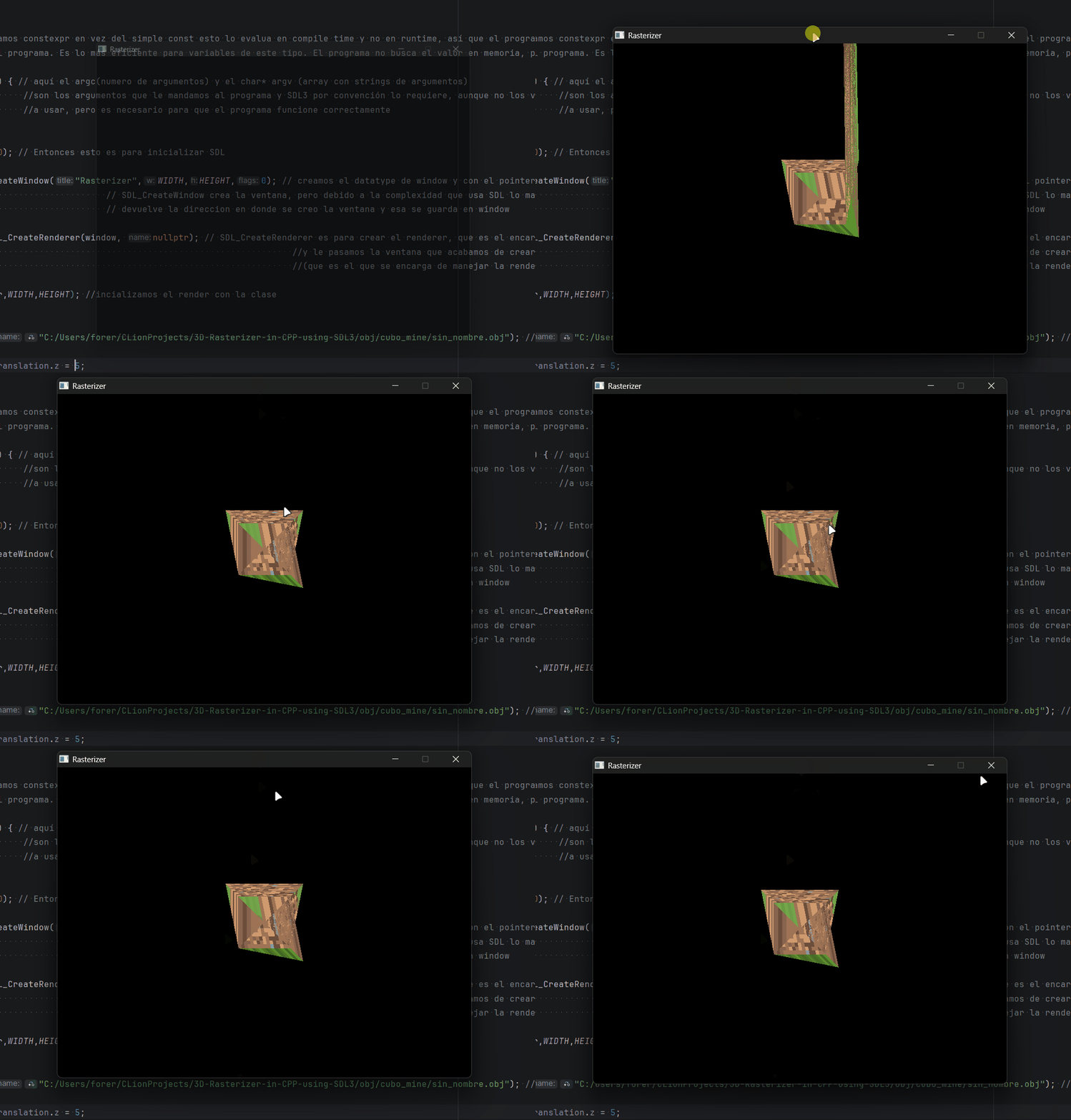
Wrong vertex indices — geometry completely distorted.
Result
The visual results of the parser — the Minecraft cube with texture — appear in the next section, UV Texturing, where sampling the texture is fully implemented.